Website Design

Website Design

Website Design

Insights

Insights

Insights

December 3, 2025

December 3, 2025

December 3, 2025

Storytelling in UI/UX Design: A Complete Guide

Storytelling in UI/UX Design: A Complete Guide

Storytelling in UI/UX Design: A Complete Guide

Discover how storytelling in UI/UX design creates engaging user journeys. This guide breaks down core principles and practical examples to elevate your designs.

Discover how storytelling in UI/UX design creates engaging user journeys. This guide breaks down core principles and practical examples to elevate your designs.

Discover how storytelling in UI/UX design creates engaging user journeys. This guide breaks down core principles and practical examples to elevate your designs.

4 mins

4 mins

4 mins

Author:

Siddharth Vij

Co-Founder, Bricx

Hi, I'm Sid. I lead design at Bricx. We work with B2B & AI SaaS companies to craft unforgettable user experiences.

At its heart, storytelling in UI/UX design is about guiding a user through your product as if they’re the main character in a compelling story. Instead of just throwing a bunch of screens and buttons at them, you’re creating a deliberate narrative.

This story has a clear beginning, a challenge to overcome, and a rewarding conclusion, turning a simple interface into a memorable, human-focused experience.


What Storytelling in UI/UX Design Actually Means

Let’s cut through the buzzwords. Imagine a typical interface is like a dictionary—it’s functional, giving you information when you ask for it, but the whole interaction feels transactional and cold. A product that uses storytelling, on the other hand, is more like a seasoned guide leading you on an expedition.

This guide doesn’t just point you toward the mountaintop; they anticipate your needs, explain the terrain ahead, and make the entire journey feel intuitive and even exciting.


A hand holds a smartphone displaying 'User journey' text, with a blurred laptop in the background.


When you take this narrative approach, your product stops being just a tool and starts becoming an experience. Every interaction, from the first moment of onboarding to finally completing a key task, becomes another chapter in the user's personal story with your brand.


The User as the Protagonist

In this way of thinking, the user is always the hero of the story. Their goals are the quest, and their pain points are the dragons they need to slay.

The UI acts as both the setting and the helpful sidekick, providing the tools and guidance needed to overcome obstacles and reach a satisfying resolution. This perspective shift is crucial: we stop designing systems and start designing journeys.

A narrative-driven design isn’t just about making things look pretty; it's a powerful way to build trust and make the product’s purpose crystal clear. This approach is now a serious competitive advantage.

The numbers don't lie—companies that nail their user experience grow twice as fast as their peers, with every $1 invested in UX returning approximately $100. And with 77% of brands now saying customer experience is their key differentiator, the power of a good story is impossible to ignore. You can discover more insights about UX statistics on Maze.co.

Storytelling transforms a user’s interaction from a series of clicks into a meaningful progression. It’s the difference between following a checklist and embarking on an adventure.


Core Components of a Narrative-Driven Interface

To actually build a story within your UI, you need a few core components working in harmony. Each one plays a specific part in shaping how the user feels and what they do next, creating a single, cohesive experience from the moment they arrive.


Core Components of a Narrative-Driven Interface

Here's a breakdown of the fundamental elements that bring a product's story to life.


Component

Role in the User's Story

Onboarding

The Prologue. This is where you introduce the "world" of your app and set the stage for the journey ahead.

Microcopy

The Narrator's Voice. These little bits of text guide, reassure, and add personality at key moments.

User Flow

The Plot. This is the sequence of events that carries the user from their initial problem to a final resolution.

Friction Points

The Conflict. These are the challenges the hero must overcome, like a complex form or a tricky decision.

Success States

The Resolution. This provides a satisfying conclusion to a task, celebrating the user's victory.


By weaving these elements together, you're not just building a product that people can use. You’re creating one that connects with them on an emotional level—one they’ll actually want to come back to.


Why a Good Story Elevates Your User Experience

In the world of SaaS and B2B products, connecting with users on a human level isn't just a nice bonus—it's a core business strategy. Storytelling is the bridge between a merely functional product and an experience that sticks. This isn’t about adding fluff; it's about deliberately crafting a journey that feels natural, smooths out the rough edges, and builds a real connection to your brand.

At its heart, a good story makes complicated things feel simple. It’s just how our brains work. We’re wired to latch onto narratives, not just raw data or a jumble of tasks. In fact, research shows that information wrapped in a story is up to 22 times more memorable than facts alone. For anyone designing a complex product, that’s a massive advantage.

Instead of just dropping users in front of a dashboard full of features, a story gives them context. It frames those tools as the solution to their specific problems, making even the most complex workflows feel purposeful and achievable.


Building Emotional Connections

Let's be honest: emotion drives our decisions. When people feel like your product "gets" them and is guiding them toward success, they start to trust it. And that trust extends to your entire brand. A well-designed narrative introduces familiar elements: a challenge (the user's pain point), a clear goal (what they want to achieve), and a satisfying resolution (getting the job done). It's a structure that just clicks with how we think.


This emotional bond pays off in very real ways. Emotionally connected customers have a 306% higher lifetime value and are far more likely to recommend a product. They’re also more forgiving when small things go wrong and more open to trying new features. If you're curious about how specific emotions can influence user behavior, you can dive deeper with tools like Plutchik's Wheel of Emotions in our detailed guide.


A user interface without a story is like a conversation without context. The words might be there, but the meaning is lost. Storytelling provides that crucial context, making every interaction feel significant.


Reducing Friction and Boosting Engagement

Friction is the silent killer of user engagement. It’s that feeling of confusion, being overwhelmed, or just not knowing what to do next. Storytelling is the perfect antidote because it creates a clear path forward. Each step makes sense in the context of the last, guiding the user toward their goal with confidence.

Think about the tangible benefits here:


  • Simplified Onboarding: A story transforms a boring feature tutorial into an engaging introduction that sets the user up for success.

  • Increased Task Completion: When users understand where they are in the "plot," they're far more motivated to see a task through to the end.

  • Higher Feature Adoption: New features are no longer just abstract tools. They become new chapters in the user's ongoing journey, making them much more appealing to explore.


By weaving interactions into a coherent narrative, you're not just plugging holes where users might drop off. You're creating an environment where they feel capable and motivated.


The Competitive Advantage of Narrative

In a crowded market, simply having great features isn't enough to stand out anymore. The products that truly win are the ones that create an experience people want to come back to. Adopting a story-first mindset is a powerful way to set yourself apart and get tangible results.

A well-told story leads directly to:

  1. Higher Conversion Rates: An intuitive, frictionless journey naturally leads more people from curiosity to action.

  2. Stronger Customer Loyalty: Emotional connection is the glue that makes customers stick around. When they feel like part of your brand's story, they’re far less likely to churn.

  3. Improved User Engagement: A good narrative keeps people invested, encouraging them to spend more time with your product and discover its full value.


Ultimately, investing in UI/UX storytelling is an investment in the relationship you have with your users. It shows them you understand their world and are committed to helping them succeed—transforming your product from a simple tool into an indispensable partner.


The Building Blocks of a Compelling UX Story
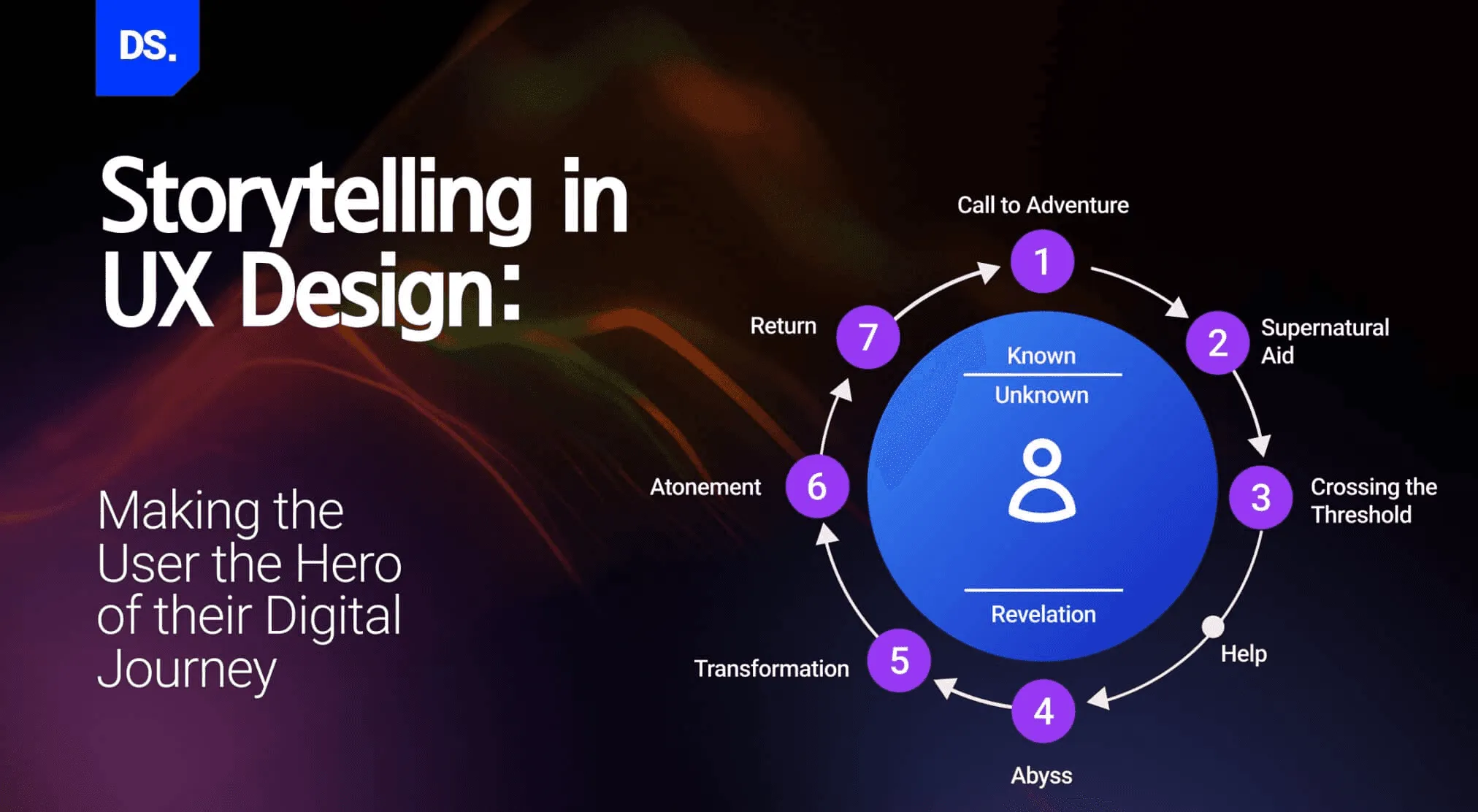

Building Blocks of a Compelling UX Story


Great stories aren't just a happy accident; they're built piece by piece with intentional, time-tested elements. The same goes for storytelling in UI/UX design. When you break down the classic components of a narrative, you can map them directly onto the interfaces you build, turning a simple set of interactions into a journey that actually means something.

This framework gives you a way to consciously weave a story into every click, scroll, and notification. It takes design from being just functional to being emotionally resonant. When you look at your product this way, a confusing checkout form is no longer just a usability problem—it’s a frustrating plot twist that trips up your hero.


Meet the Main Character: Your User

Every story needs a hero, and in the world of your product, that hero is always the user. This isn’t just a nice-sounding metaphor; it’s a fundamental shift in how you see your work. The user shows up with a goal in mind, a quest they need to complete. Your entire design should be built to help this character win.

To pull this off, you have to get inside their head. You need to understand their motivations, their frustrations, and what a "happily ever after" looks like for them. What are they trying to do? What roadblocks have they hit in the past? Answering these questions builds real empathy and helps you design a journey that truly serves its hero.

"When UX doesn’t consider the user’s story—their starting point, their motivations, their desired ending—it’s like writing a book with no main character. The plot may exist, but no one will care about the outcome."


Setting the Scene: The Interface

The setting is the world where your story takes place. In UI/UX, that world is your app, website, or software. Everything from the visual design and layout to the color palette creates this environment. Is your world clean, professional, and efficient, like a modern lab? Or is it playful, colorful, and encouraging, like a friendly cartoon universe?

A good setting feels consistent and intuitive, letting the hero navigate with confidence. It doesn't just look good; it supports the plot by making the path forward clear and easy to understand. It makes the hero feel capable and in control.


Driving the Narrative: The Plot and Conflict

Every good story is propelled by a central plot and the conflict that gets in the way of the goal.

  • The Plot: This is simply the user's primary goal. It’s the why behind their entire journey. For an e-commerce site, the plot is finding and buying the perfect product. For a project management tool, it’s taming a chaotic project. Your UI needs to make this plot obvious from the moment they arrive.

  • The Conflict: These are the friction points—the challenges and obstacles the user faces. Conflict can be anything from a complicated form to a confusing menu or a vague error message. While our job is to eliminate bad conflict (poor design), a little bit of healthy conflict is what creates a sense of accomplishment.


Great design turns these potential roadblocks into moments of guidance. For instance, a well-written error message doesn’t just point out a problem; it offers a solution, turning a dead end into a helpful detour. This is where effective UX writing becomes so critical, transforming friction into clear, supportive dialogue. To see just how powerful words can be, check out some good UX writing examples in our related article.


Achieving the Goal: The Resolution

Finally, every hero's journey needs a satisfying resolution. In UX, the resolution is that moment of success when the user completes their task. It’s the confirmation screen after a purchase, the "Project Created!" pop-up, or the simple checkmark that appears when a file finishes uploading.

This is your chance to deliver a real sense of accomplishment and closure. The small details matter more than you think. A little celebratory animation, a clear confirmation message, or a quick summary of what they achieved reinforces that their effort was worthwhile. A positive ending doesn't just close out one story; it makes the user eager to come back and start the next one.


Putting Narrative to Work with Proven Design Patterns


Putting Narrative to Work with Proven Design Patterns


Theory is great, but the real magic begins when we turn storytelling principles into actual, interactive design elements. That's where proven design patterns come in. Think of them as your toolkit for building a narrative right into the user experience. These patterns are how we translate abstract ideas like "plot" and "conflict" into the buttons, flows, and text users interact with every day.

By using these patterns intentionally, you're no longer just showing people a bunch of features. You’re guiding them. You're crafting a compelling beginning, developing the plot, and providing a narrator's voice to make the entire journey feel connected and meaningful. It’s about making every click part of a bigger story.

The best way to visualize this is to see how classic story elements map directly onto the UX design process, with the user always at the center of the action.
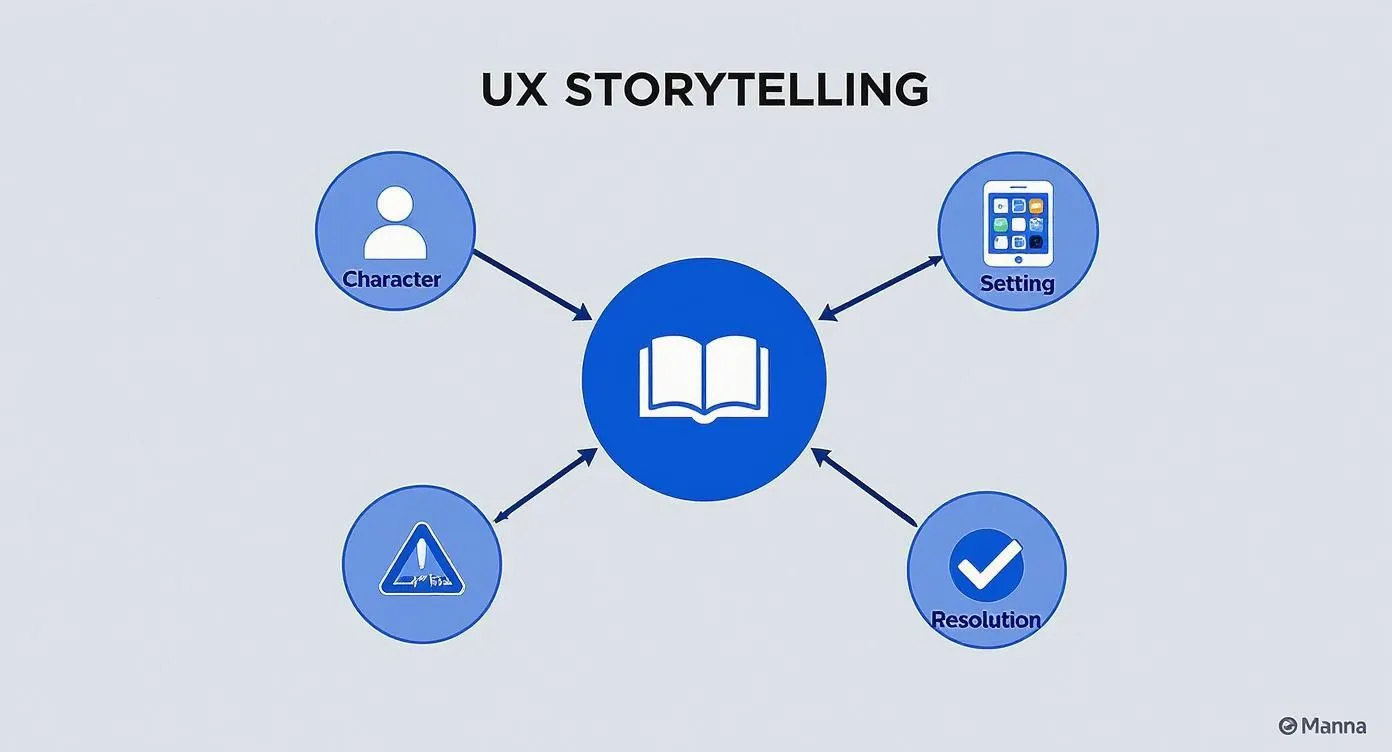

A UX storytelling diagram featuring a central open book with elements: character, setting, problem, and resolution.

This diagram shows how every great story—and every great user experience—is built around a character (the user) who navigates a setting (your product) to overcome a problem and reach a successful resolution.


Crafting The Prologue With Onboarding Flows

A user's first few moments inside your product are everything. This is your story's prologue, and you only get one chance to make a first impression. A truly effective onboarding flow doesn't just throw a checklist of features at someone. It sets the stage, introduces the "world" of your app, and casts the user as the hero who is about to accomplish something important.


Think of it like the first chapter of a book. Your job is to hook them and give them a compelling reason to keep going.

  • Establish the Goal: Frame the value proposition as a story. Instead of, "Here are our features," try, "You're about to solve [their problem] and achieve [their goal]."

  • Introduce the Tools: Reveal key tools only when they become relevant to the user's quest. This prevents them from feeling overwhelmed right at the start.

  • Create Early Wins: Guide the user to their first small victory. That little moment of success builds confidence and momentum, encouraging them to dive deeper into their journey.


Outlining The Plot With User Journey Maps

If onboarding is the prologue, then the user journey map is the full plot outline. This essential tool helps you visualize every single step a user takes to reach their goal, from their first inkling of a need to their final, triumphant success. It lets you see the entire narrative arc at a glance, helping you identify key scenes, potential roadblocks (conflicts), and satisfying moments of resolution.

Mapping this journey allows you to intentionally design the emotional highs and lows of the experience. You can learn more about building these narrative blueprints in our guide on customer journey maps. This process ensures every touchpoint contributes to a story that feels cohesive and rewarding.


A user journey map is the script for your user's experience. It ensures every interaction, every screen, and every message serves the central plot of helping the user succeed.


Finding The Narrator’s Voice In Microcopy And Motion

Microcopy—those little bits of text on buttons, error messages, and tooltips—is your narrator's voice. It’s what guides, reassures, and gives your product a personality. A well-worded error message, for instance, can turn a moment of frustrating conflict into a helpful plot point. Instead of a dead-end "Invalid Input," a message like "Oops, that email doesn't look quite right. Let's try that again" feels like a supportive friend, not a cold machine.

These seemingly small details have a massive impact. A thoughtfully designed UI can boost conversion rates by up to 200%, and UX strategies that weave in strong storytelling can push that figure closer to 400%.


Building Momentum With Progress Indicators

Progress bars and step-by-step indicators are simple but incredibly powerful narrative tools. They create a tangible sense of forward momentum and anticipation. Watching a bar fill up or moving from "Step 1 of 3" to "Step 2 of 3" tells a micro-story of progress. It answers the user's silent questions: Where am I? Where am I going? Am I almost there?

This visual feedback makes complex tasks feel far more manageable and less intimidating, encouraging users to see the story through to the end. As technology evolves, designers can even explore AI story creation tools to brainstorm and structure more compelling user-centric narratives, adding a new layer of sophistication to the design process.

To help you decide which pattern to use and when, here’s a quick comparison of the techniques we've covered.


Storytelling Techniques Comparison


Technique

Primary Goal

Best For

Onboarding Flows

Introduce the "world" and hero

First-time user experiences, feature introductions, setting the stage

User Journey Maps

Outline the entire narrative arc

Understanding the end-to-end user experience, identifying pain points

Microcopy

Provide the narrator's voice

Guiding users, adding personality, humanizing error messages and alerts

Progress Indicators

Show forward momentum

Multi-step forms, complex setup processes, long tasks, data uploads


Each of these techniques plays a distinct role, but they work best when used together to create a seamless and engaging narrative from start to finish.


Real-World Examples of Storytelling in Action

It’s one thing to talk about theory, but seeing storytelling in ui/ux design out in the wild is where it all starts to click. The most successful products you use every day are master storytellers, even if you don't consciously notice it. They weave narratives so seamlessly into the experience that your interactions feel less like completing a task and more like a natural journey toward a goal.

Three digital screens display text and 'IN' on a white wall, with 'Story in Action' written beside them.


Let's break down how some of the best in the business do it. This isn't just a gallery of pretty designs; it’s a lookbook showing how the principles we've discussed are actually put into practice. You'll see that a well-told story is the invisible engine that drives user engagement and keeps people coming back.


Duolingo: The Hero’s Journey of Language Learning
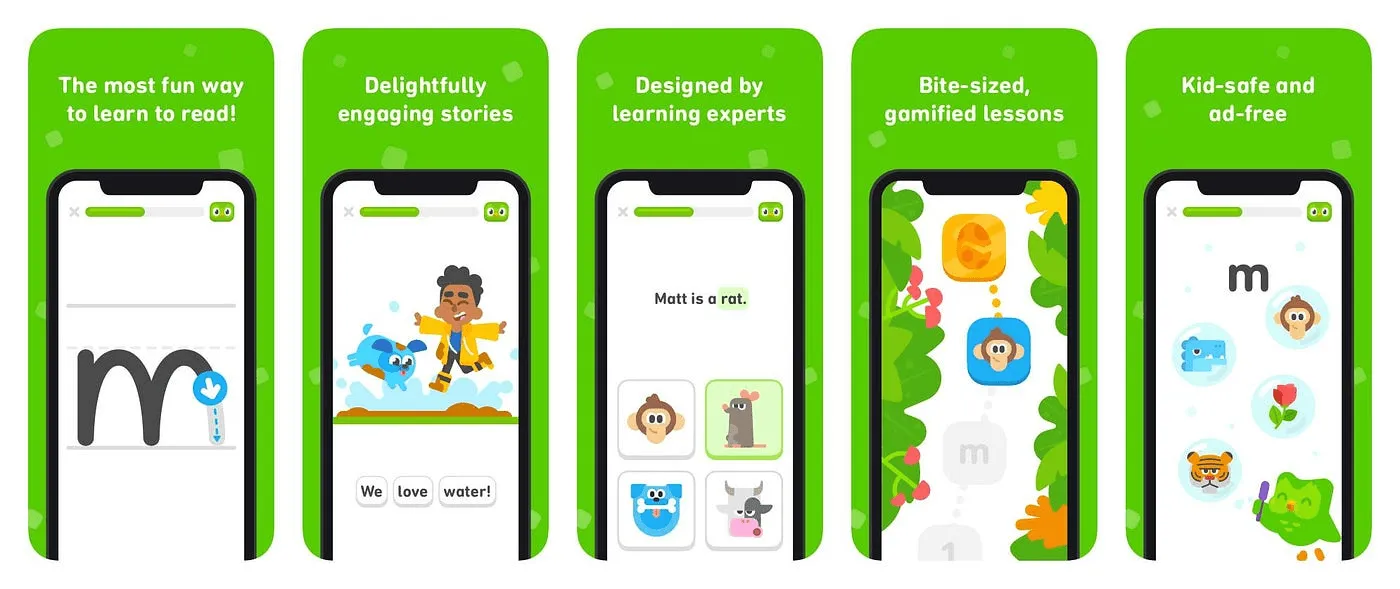

Duolingo


Duolingo managed to turn the often-dreaded task of learning a new language into an addictive adventure. The app doesn't just throw lessons at you; it tells an ongoing story of personal growth where you are the hero.


  • Characters as Companions: The cast of quirky characters, like Duo the owl, aren't just brand mascots. They’re mentors and sidekicks on your quest, celebrating your wins and nudging you forward when you stumble.

  • A Gamified Plot: The entire learning path is framed as a journey. Each lesson you complete moves you further along a visual map, conquering new skills and unlocking the next level. This creates a powerful sense of momentum that makes you want to see what's next.

  • Conflict and Resolution: Getting an answer wrong isn't a failure—it's just a minor plot twist. The app’s gentle corrections and "hearts" system create low-stakes conflict, which makes finally acing a level feel that much more satisfying.


By framing learning as a story of progress and achievement, Duolingo keeps users motivated and invested in their own heroic saga.


Headspace: The Calming Narrative of Mindfulness
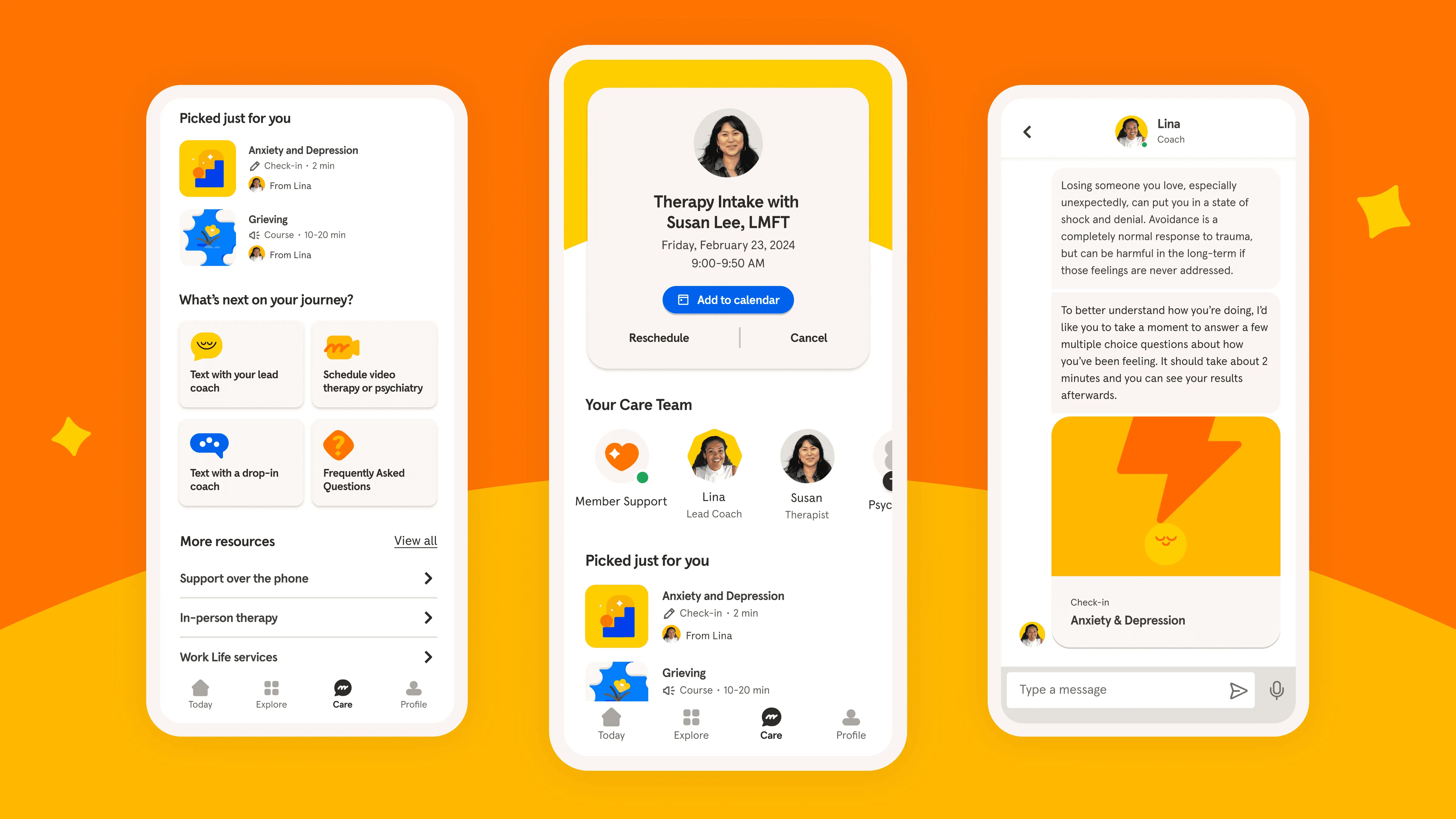

Headspace


Headspace's storytelling is much quieter, but no less powerful. The app’s entire design is built around one simple, soothing narrative: guiding you from a state of stress or distraction to a place of calm and focus.


The animations are slow and deliberate. The color palette is soft. The microcopy is reassuring and kind. Even the onboarding process tells a mini-story, welcoming you into a safe space and setting the stage for a journey toward a more mindful you. If you want to see how companies map these flows, check out these customer journey mapping examples that show how user narratives are planned across every touchpoint.

Headspace doesn't just sell meditation sessions; it wraps you in an experience of tranquility. Every single element works together to tell a story of slowing down, breathing, and finding a moment of peace.


Slack: The Collaborative Saga of Teamwork
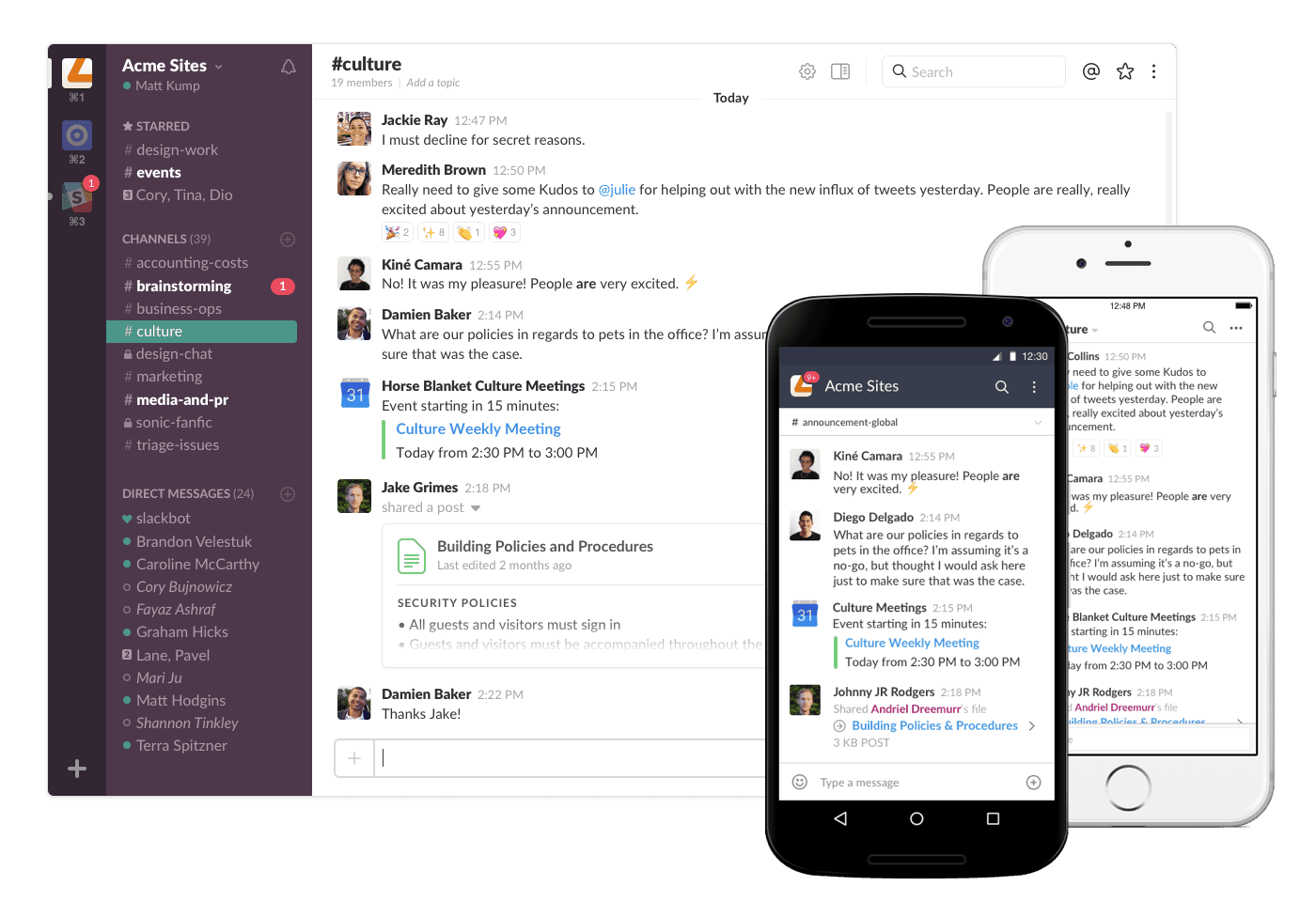

Slack


Slack is brilliant at telling a story of productive—and even pleasant—teamwork. Its core narrative is all about transforming the chaos of team communication into something organized, efficient, and maybe even a little fun. This story comes to life through its features and personality-packed microcopy.

When you start a new channel, the process isn't framed as a technical setup. Instead, it feels like the beginning of a new project or team adventure. Helpful little tips from Slackbot act like a friendly narrator, guiding your team toward its goal.

Even the smallest details add to this story. The satisfying little "knock brush" sound of a new message or a celebratory emoji reaction are tiny story beats that make work feel less like, well, work. These touches are perfect examples of how to build a narrative, and you can get more ideas from our guide to micro interactions for 2025 and beyond.

Looking at these apps, it’s obvious that storytelling isn't just a decorative layer. It's a strategic framework for designing products that connect on a human level, turning users into loyal protagonists in a story they genuinely want to be a part of.

A great story should get great results, right? After all the work of weaving a narrative into your user experience, you need to see if it actually worked. This is the moment of truth, where creative design meets business goals. Measuring the impact is how you prove to stakeholders that storytelling in UI/UX design isn't just fluff—it's a serious driver of growth.

It’s all about tracking the right things. A good UX story should change how people behave on your platform, for the better. By looking at both the hard numbers and the human feedback, you get the full picture of how your narrative is landing and where you can make it even better.


Key Quantitative Metrics to Track

The numbers don't lie. Hard data gives you objective proof that your story is resonating and shows what users are doing differently after you’ve implemented a narrative-driven design.

Here are the core indicators to start with:


  • User Engagement Rates: Are people sticking around longer? Look for an uptick in session duration, more daily active users, and more clicks per session. A story that pulls people in makes them want to explore.

  • Feature Adoption: If your story is designed to guide users to a specific feature, are they actually using it? A 15-20% increase in the adoption of a feature you've highlighted is a fantastic sign that your narrative is doing its job.

  • Conversion Rates: Your story should make it easier and more compelling for users to take that next step, whether it's signing up for a trial or upgrading their plan. A well-told story can give these critical numbers a real boost.

  • Retention and Churn: When users feel a connection to your product, they're more likely to stay. Keep an eye on your retention rates and look for a drop in the percentage of users who cancel each month.


Gathering Qualitative Insights


Gathering Qualitative Insights


While the numbers tell you what's happening, the qualitative feedback tells you why. This is where you find out if your story is hitting the right emotional notes.

Qualitative data reveals the human side of your UX story. It tells you if users feel understood, supported, and empowered, which are the ultimate goals of any narrative-driven design.


The best way to get these insights is to talk to your users. Run some user testing sessions, dig through survey responses, and see what people are telling your support team. Ask open-ended questions like, "How did this part of the process make you feel?" or "Was there any point where you felt lost?" This kind of feedback is gold for fine-tuning your story's tone and making it clearer.


For a deeper dive into the specific data points that can inform your analysis, explore our comprehensive guide on essential usability metrics. When you combine the quantitative "what" with the qualitative "why," you build an undeniable, data-backed case for the ROI of your UX story.


Got Questions About Storytelling in UI/UX? We've Got Answers.

When designers and product teams start digging into narrative design, a few key questions always seem to pop up. Let's tackle some of the most common ones with clear, practical answers.


Is Storytelling Just for Fun Consumer Apps?

Absolutely not. While it's easy to spot storytelling in consumer-facing apps like Duolingo, the same principles are incredibly powerful for complex B2B and SaaS products. Think about it: a narrative can transform a complicated enterprise software setup from a daunting chore into a guided, step-by-step journey.

By framing your features as tools that help solve a specific business challenge (the "plot" of their story), you don't just show users what a button does—you show them how it helps them win. This approach boosts user adoption and proves your product's value right out of the gate.

Storytelling in B2B software isn’t about entertainment; it’s about creating clarity and purpose. It helps users understand why a feature exists and how it will help them succeed.


How Can a Small Team with Limited Resources Start?

You don't need a massive budget or a dedicated "storytelling department" to get started. The best place to begin is with your microcopy. Take a hard look at your error messages, button labels, and loading screens. Could they be more human, helpful, or even a little encouraging?

Your user onboarding flow is another perfect place to start. Instead of a sterile, feature-dump tour, reframe it as the first chapter of the user's success story with your product. These small, focused tweaks can make a surprisingly big difference in building an emotional connection.


What's the Real Difference Between Storytelling and a Good User Journey?

This is a great question because it gets to the heart of the matter. A user journey map is the skeleton—it outlines the what. It details the steps a user takes to get something done. Storytelling is the muscle and soul you build around that skeleton—it explains the why.

Here’s a simple way to think about it:


  • User Journey: A purely mechanical sequence of events. (The user clicks Button A, then fills out Form B.)

  • Storytelling: The narrative that gives those events meaning. (Our hero, the user, is trying to overcome a frustrating obstacle to achieve a rewarding goal.)


Storytelling adds that essential layer of context and emotion. It transforms a series of clicks into an engaging experience with a clear beginning, a challenge to overcome, and a satisfying resolution at the end.

Ready to tell your product's story? At Bricx, we specialize in designing intuitive, narrative-driven experiences for B2B and AI SaaS companies that captivate users and drive results. Learn more about our design services.

At its heart, storytelling in UI/UX design is about guiding a user through your product as if they’re the main character in a compelling story. Instead of just throwing a bunch of screens and buttons at them, you’re creating a deliberate narrative.

This story has a clear beginning, a challenge to overcome, and a rewarding conclusion, turning a simple interface into a memorable, human-focused experience.


What Storytelling in UI/UX Design Actually Means

Let’s cut through the buzzwords. Imagine a typical interface is like a dictionary—it’s functional, giving you information when you ask for it, but the whole interaction feels transactional and cold. A product that uses storytelling, on the other hand, is more like a seasoned guide leading you on an expedition.

This guide doesn’t just point you toward the mountaintop; they anticipate your needs, explain the terrain ahead, and make the entire journey feel intuitive and even exciting.


A hand holds a smartphone displaying 'User journey' text, with a blurred laptop in the background.


When you take this narrative approach, your product stops being just a tool and starts becoming an experience. Every interaction, from the first moment of onboarding to finally completing a key task, becomes another chapter in the user's personal story with your brand.


The User as the Protagonist

In this way of thinking, the user is always the hero of the story. Their goals are the quest, and their pain points are the dragons they need to slay.

The UI acts as both the setting and the helpful sidekick, providing the tools and guidance needed to overcome obstacles and reach a satisfying resolution. This perspective shift is crucial: we stop designing systems and start designing journeys.

A narrative-driven design isn’t just about making things look pretty; it's a powerful way to build trust and make the product’s purpose crystal clear. This approach is now a serious competitive advantage.

The numbers don't lie—companies that nail their user experience grow twice as fast as their peers, with every $1 invested in UX returning approximately $100. And with 77% of brands now saying customer experience is their key differentiator, the power of a good story is impossible to ignore. You can discover more insights about UX statistics on Maze.co.

Storytelling transforms a user’s interaction from a series of clicks into a meaningful progression. It’s the difference between following a checklist and embarking on an adventure.


Core Components of a Narrative-Driven Interface

To actually build a story within your UI, you need a few core components working in harmony. Each one plays a specific part in shaping how the user feels and what they do next, creating a single, cohesive experience from the moment they arrive.


Core Components of a Narrative-Driven Interface

Here's a breakdown of the fundamental elements that bring a product's story to life.


Component

Role in the User's Story

Onboarding

The Prologue. This is where you introduce the "world" of your app and set the stage for the journey ahead.

Microcopy

The Narrator's Voice. These little bits of text guide, reassure, and add personality at key moments.

User Flow

The Plot. This is the sequence of events that carries the user from their initial problem to a final resolution.

Friction Points

The Conflict. These are the challenges the hero must overcome, like a complex form or a tricky decision.

Success States

The Resolution. This provides a satisfying conclusion to a task, celebrating the user's victory.


By weaving these elements together, you're not just building a product that people can use. You’re creating one that connects with them on an emotional level—one they’ll actually want to come back to.


Why a Good Story Elevates Your User Experience

In the world of SaaS and B2B products, connecting with users on a human level isn't just a nice bonus—it's a core business strategy. Storytelling is the bridge between a merely functional product and an experience that sticks. This isn’t about adding fluff; it's about deliberately crafting a journey that feels natural, smooths out the rough edges, and builds a real connection to your brand.

At its heart, a good story makes complicated things feel simple. It’s just how our brains work. We’re wired to latch onto narratives, not just raw data or a jumble of tasks. In fact, research shows that information wrapped in a story is up to 22 times more memorable than facts alone. For anyone designing a complex product, that’s a massive advantage.

Instead of just dropping users in front of a dashboard full of features, a story gives them context. It frames those tools as the solution to their specific problems, making even the most complex workflows feel purposeful and achievable.


Building Emotional Connections

Let's be honest: emotion drives our decisions. When people feel like your product "gets" them and is guiding them toward success, they start to trust it. And that trust extends to your entire brand. A well-designed narrative introduces familiar elements: a challenge (the user's pain point), a clear goal (what they want to achieve), and a satisfying resolution (getting the job done). It's a structure that just clicks with how we think.


This emotional bond pays off in very real ways. Emotionally connected customers have a 306% higher lifetime value and are far more likely to recommend a product. They’re also more forgiving when small things go wrong and more open to trying new features. If you're curious about how specific emotions can influence user behavior, you can dive deeper with tools like Plutchik's Wheel of Emotions in our detailed guide.


A user interface without a story is like a conversation without context. The words might be there, but the meaning is lost. Storytelling provides that crucial context, making every interaction feel significant.


Reducing Friction and Boosting Engagement

Friction is the silent killer of user engagement. It’s that feeling of confusion, being overwhelmed, or just not knowing what to do next. Storytelling is the perfect antidote because it creates a clear path forward. Each step makes sense in the context of the last, guiding the user toward their goal with confidence.

Think about the tangible benefits here:


  • Simplified Onboarding: A story transforms a boring feature tutorial into an engaging introduction that sets the user up for success.

  • Increased Task Completion: When users understand where they are in the "plot," they're far more motivated to see a task through to the end.

  • Higher Feature Adoption: New features are no longer just abstract tools. They become new chapters in the user's ongoing journey, making them much more appealing to explore.


By weaving interactions into a coherent narrative, you're not just plugging holes where users might drop off. You're creating an environment where they feel capable and motivated.


The Competitive Advantage of Narrative

In a crowded market, simply having great features isn't enough to stand out anymore. The products that truly win are the ones that create an experience people want to come back to. Adopting a story-first mindset is a powerful way to set yourself apart and get tangible results.

A well-told story leads directly to:

  1. Higher Conversion Rates: An intuitive, frictionless journey naturally leads more people from curiosity to action.

  2. Stronger Customer Loyalty: Emotional connection is the glue that makes customers stick around. When they feel like part of your brand's story, they’re far less likely to churn.

  3. Improved User Engagement: A good narrative keeps people invested, encouraging them to spend more time with your product and discover its full value.


Ultimately, investing in UI/UX storytelling is an investment in the relationship you have with your users. It shows them you understand their world and are committed to helping them succeed—transforming your product from a simple tool into an indispensable partner.


The Building Blocks of a Compelling UX Story


Building Blocks of a Compelling UX Story


Great stories aren't just a happy accident; they're built piece by piece with intentional, time-tested elements. The same goes for storytelling in UI/UX design. When you break down the classic components of a narrative, you can map them directly onto the interfaces you build, turning a simple set of interactions into a journey that actually means something.

This framework gives you a way to consciously weave a story into every click, scroll, and notification. It takes design from being just functional to being emotionally resonant. When you look at your product this way, a confusing checkout form is no longer just a usability problem—it’s a frustrating plot twist that trips up your hero.


Meet the Main Character: Your User

Every story needs a hero, and in the world of your product, that hero is always the user. This isn’t just a nice-sounding metaphor; it’s a fundamental shift in how you see your work. The user shows up with a goal in mind, a quest they need to complete. Your entire design should be built to help this character win.

To pull this off, you have to get inside their head. You need to understand their motivations, their frustrations, and what a "happily ever after" looks like for them. What are they trying to do? What roadblocks have they hit in the past? Answering these questions builds real empathy and helps you design a journey that truly serves its hero.

"When UX doesn’t consider the user’s story—their starting point, their motivations, their desired ending—it’s like writing a book with no main character. The plot may exist, but no one will care about the outcome."


Setting the Scene: The Interface

The setting is the world where your story takes place. In UI/UX, that world is your app, website, or software. Everything from the visual design and layout to the color palette creates this environment. Is your world clean, professional, and efficient, like a modern lab? Or is it playful, colorful, and encouraging, like a friendly cartoon universe?

A good setting feels consistent and intuitive, letting the hero navigate with confidence. It doesn't just look good; it supports the plot by making the path forward clear and easy to understand. It makes the hero feel capable and in control.


Driving the Narrative: The Plot and Conflict

Every good story is propelled by a central plot and the conflict that gets in the way of the goal.

  • The Plot: This is simply the user's primary goal. It’s the why behind their entire journey. For an e-commerce site, the plot is finding and buying the perfect product. For a project management tool, it’s taming a chaotic project. Your UI needs to make this plot obvious from the moment they arrive.

  • The Conflict: These are the friction points—the challenges and obstacles the user faces. Conflict can be anything from a complicated form to a confusing menu or a vague error message. While our job is to eliminate bad conflict (poor design), a little bit of healthy conflict is what creates a sense of accomplishment.


Great design turns these potential roadblocks into moments of guidance. For instance, a well-written error message doesn’t just point out a problem; it offers a solution, turning a dead end into a helpful detour. This is where effective UX writing becomes so critical, transforming friction into clear, supportive dialogue. To see just how powerful words can be, check out some good UX writing examples in our related article.


Achieving the Goal: The Resolution

Finally, every hero's journey needs a satisfying resolution. In UX, the resolution is that moment of success when the user completes their task. It’s the confirmation screen after a purchase, the "Project Created!" pop-up, or the simple checkmark that appears when a file finishes uploading.

This is your chance to deliver a real sense of accomplishment and closure. The small details matter more than you think. A little celebratory animation, a clear confirmation message, or a quick summary of what they achieved reinforces that their effort was worthwhile. A positive ending doesn't just close out one story; it makes the user eager to come back and start the next one.


Putting Narrative to Work with Proven Design Patterns


Putting Narrative to Work with Proven Design Patterns


Theory is great, but the real magic begins when we turn storytelling principles into actual, interactive design elements. That's where proven design patterns come in. Think of them as your toolkit for building a narrative right into the user experience. These patterns are how we translate abstract ideas like "plot" and "conflict" into the buttons, flows, and text users interact with every day.

By using these patterns intentionally, you're no longer just showing people a bunch of features. You’re guiding them. You're crafting a compelling beginning, developing the plot, and providing a narrator's voice to make the entire journey feel connected and meaningful. It’s about making every click part of a bigger story.

The best way to visualize this is to see how classic story elements map directly onto the UX design process, with the user always at the center of the action.


A UX storytelling diagram featuring a central open book with elements: character, setting, problem, and resolution.

This diagram shows how every great story—and every great user experience—is built around a character (the user) who navigates a setting (your product) to overcome a problem and reach a successful resolution.


Crafting The Prologue With Onboarding Flows

A user's first few moments inside your product are everything. This is your story's prologue, and you only get one chance to make a first impression. A truly effective onboarding flow doesn't just throw a checklist of features at someone. It sets the stage, introduces the "world" of your app, and casts the user as the hero who is about to accomplish something important.


Think of it like the first chapter of a book. Your job is to hook them and give them a compelling reason to keep going.

  • Establish the Goal: Frame the value proposition as a story. Instead of, "Here are our features," try, "You're about to solve [their problem] and achieve [their goal]."

  • Introduce the Tools: Reveal key tools only when they become relevant to the user's quest. This prevents them from feeling overwhelmed right at the start.

  • Create Early Wins: Guide the user to their first small victory. That little moment of success builds confidence and momentum, encouraging them to dive deeper into their journey.


Outlining The Plot With User Journey Maps

If onboarding is the prologue, then the user journey map is the full plot outline. This essential tool helps you visualize every single step a user takes to reach their goal, from their first inkling of a need to their final, triumphant success. It lets you see the entire narrative arc at a glance, helping you identify key scenes, potential roadblocks (conflicts), and satisfying moments of resolution.

Mapping this journey allows you to intentionally design the emotional highs and lows of the experience. You can learn more about building these narrative blueprints in our guide on customer journey maps. This process ensures every touchpoint contributes to a story that feels cohesive and rewarding.


A user journey map is the script for your user's experience. It ensures every interaction, every screen, and every message serves the central plot of helping the user succeed.


Finding The Narrator’s Voice In Microcopy And Motion

Microcopy—those little bits of text on buttons, error messages, and tooltips—is your narrator's voice. It’s what guides, reassures, and gives your product a personality. A well-worded error message, for instance, can turn a moment of frustrating conflict into a helpful plot point. Instead of a dead-end "Invalid Input," a message like "Oops, that email doesn't look quite right. Let's try that again" feels like a supportive friend, not a cold machine.

These seemingly small details have a massive impact. A thoughtfully designed UI can boost conversion rates by up to 200%, and UX strategies that weave in strong storytelling can push that figure closer to 400%.


Building Momentum With Progress Indicators

Progress bars and step-by-step indicators are simple but incredibly powerful narrative tools. They create a tangible sense of forward momentum and anticipation. Watching a bar fill up or moving from "Step 1 of 3" to "Step 2 of 3" tells a micro-story of progress. It answers the user's silent questions: Where am I? Where am I going? Am I almost there?

This visual feedback makes complex tasks feel far more manageable and less intimidating, encouraging users to see the story through to the end. As technology evolves, designers can even explore AI story creation tools to brainstorm and structure more compelling user-centric narratives, adding a new layer of sophistication to the design process.

To help you decide which pattern to use and when, here’s a quick comparison of the techniques we've covered.


Storytelling Techniques Comparison


Technique

Primary Goal

Best For

Onboarding Flows

Introduce the "world" and hero

First-time user experiences, feature introductions, setting the stage

User Journey Maps

Outline the entire narrative arc

Understanding the end-to-end user experience, identifying pain points

Microcopy

Provide the narrator's voice

Guiding users, adding personality, humanizing error messages and alerts

Progress Indicators

Show forward momentum

Multi-step forms, complex setup processes, long tasks, data uploads


Each of these techniques plays a distinct role, but they work best when used together to create a seamless and engaging narrative from start to finish.


Real-World Examples of Storytelling in Action

It’s one thing to talk about theory, but seeing storytelling in ui/ux design out in the wild is where it all starts to click. The most successful products you use every day are master storytellers, even if you don't consciously notice it. They weave narratives so seamlessly into the experience that your interactions feel less like completing a task and more like a natural journey toward a goal.


Three digital screens display text and 'IN' on a white wall, with 'Story in Action' written beside them.


Let's break down how some of the best in the business do it. This isn't just a gallery of pretty designs; it’s a lookbook showing how the principles we've discussed are actually put into practice. You'll see that a well-told story is the invisible engine that drives user engagement and keeps people coming back.


Duolingo: The Hero’s Journey of Language Learning


Duolingo


Duolingo managed to turn the often-dreaded task of learning a new language into an addictive adventure. The app doesn't just throw lessons at you; it tells an ongoing story of personal growth where you are the hero.


  • Characters as Companions: The cast of quirky characters, like Duo the owl, aren't just brand mascots. They’re mentors and sidekicks on your quest, celebrating your wins and nudging you forward when you stumble.

  • A Gamified Plot: The entire learning path is framed as a journey. Each lesson you complete moves you further along a visual map, conquering new skills and unlocking the next level. This creates a powerful sense of momentum that makes you want to see what's next.

  • Conflict and Resolution: Getting an answer wrong isn't a failure—it's just a minor plot twist. The app’s gentle corrections and "hearts" system create low-stakes conflict, which makes finally acing a level feel that much more satisfying.


By framing learning as a story of progress and achievement, Duolingo keeps users motivated and invested in their own heroic saga.


Headspace: The Calming Narrative of Mindfulness


Headspace


Headspace's storytelling is much quieter, but no less powerful. The app’s entire design is built around one simple, soothing narrative: guiding you from a state of stress or distraction to a place of calm and focus.


The animations are slow and deliberate. The color palette is soft. The microcopy is reassuring and kind. Even the onboarding process tells a mini-story, welcoming you into a safe space and setting the stage for a journey toward a more mindful you. If you want to see how companies map these flows, check out these customer journey mapping examples that show how user narratives are planned across every touchpoint.

Headspace doesn't just sell meditation sessions; it wraps you in an experience of tranquility. Every single element works together to tell a story of slowing down, breathing, and finding a moment of peace.


Slack: The Collaborative Saga of Teamwork


Slack


Slack is brilliant at telling a story of productive—and even pleasant—teamwork. Its core narrative is all about transforming the chaos of team communication into something organized, efficient, and maybe even a little fun. This story comes to life through its features and personality-packed microcopy.

When you start a new channel, the process isn't framed as a technical setup. Instead, it feels like the beginning of a new project or team adventure. Helpful little tips from Slackbot act like a friendly narrator, guiding your team toward its goal.

Even the smallest details add to this story. The satisfying little "knock brush" sound of a new message or a celebratory emoji reaction are tiny story beats that make work feel less like, well, work. These touches are perfect examples of how to build a narrative, and you can get more ideas from our guide to micro interactions for 2025 and beyond.

Looking at these apps, it’s obvious that storytelling isn't just a decorative layer. It's a strategic framework for designing products that connect on a human level, turning users into loyal protagonists in a story they genuinely want to be a part of.

A great story should get great results, right? After all the work of weaving a narrative into your user experience, you need to see if it actually worked. This is the moment of truth, where creative design meets business goals. Measuring the impact is how you prove to stakeholders that storytelling in UI/UX design isn't just fluff—it's a serious driver of growth.

It’s all about tracking the right things. A good UX story should change how people behave on your platform, for the better. By looking at both the hard numbers and the human feedback, you get the full picture of how your narrative is landing and where you can make it even better.


Key Quantitative Metrics to Track

The numbers don't lie. Hard data gives you objective proof that your story is resonating and shows what users are doing differently after you’ve implemented a narrative-driven design.

Here are the core indicators to start with:


  • User Engagement Rates: Are people sticking around longer? Look for an uptick in session duration, more daily active users, and more clicks per session. A story that pulls people in makes them want to explore.

  • Feature Adoption: If your story is designed to guide users to a specific feature, are they actually using it? A 15-20% increase in the adoption of a feature you've highlighted is a fantastic sign that your narrative is doing its job.

  • Conversion Rates: Your story should make it easier and more compelling for users to take that next step, whether it's signing up for a trial or upgrading their plan. A well-told story can give these critical numbers a real boost.

  • Retention and Churn: When users feel a connection to your product, they're more likely to stay. Keep an eye on your retention rates and look for a drop in the percentage of users who cancel each month.


Gathering Qualitative Insights


Gathering Qualitative Insights


While the numbers tell you what's happening, the qualitative feedback tells you why. This is where you find out if your story is hitting the right emotional notes.

Qualitative data reveals the human side of your UX story. It tells you if users feel understood, supported, and empowered, which are the ultimate goals of any narrative-driven design.


The best way to get these insights is to talk to your users. Run some user testing sessions, dig through survey responses, and see what people are telling your support team. Ask open-ended questions like, "How did this part of the process make you feel?" or "Was there any point where you felt lost?" This kind of feedback is gold for fine-tuning your story's tone and making it clearer.


For a deeper dive into the specific data points that can inform your analysis, explore our comprehensive guide on essential usability metrics. When you combine the quantitative "what" with the qualitative "why," you build an undeniable, data-backed case for the ROI of your UX story.


Got Questions About Storytelling in UI/UX? We've Got Answers.

When designers and product teams start digging into narrative design, a few key questions always seem to pop up. Let's tackle some of the most common ones with clear, practical answers.


Is Storytelling Just for Fun Consumer Apps?

Absolutely not. While it's easy to spot storytelling in consumer-facing apps like Duolingo, the same principles are incredibly powerful for complex B2B and SaaS products. Think about it: a narrative can transform a complicated enterprise software setup from a daunting chore into a guided, step-by-step journey.

By framing your features as tools that help solve a specific business challenge (the "plot" of their story), you don't just show users what a button does—you show them how it helps them win. This approach boosts user adoption and proves your product's value right out of the gate.

Storytelling in B2B software isn’t about entertainment; it’s about creating clarity and purpose. It helps users understand why a feature exists and how it will help them succeed.


How Can a Small Team with Limited Resources Start?

You don't need a massive budget or a dedicated "storytelling department" to get started. The best place to begin is with your microcopy. Take a hard look at your error messages, button labels, and loading screens. Could they be more human, helpful, or even a little encouraging?

Your user onboarding flow is another perfect place to start. Instead of a sterile, feature-dump tour, reframe it as the first chapter of the user's success story with your product. These small, focused tweaks can make a surprisingly big difference in building an emotional connection.


What's the Real Difference Between Storytelling and a Good User Journey?

This is a great question because it gets to the heart of the matter. A user journey map is the skeleton—it outlines the what. It details the steps a user takes to get something done. Storytelling is the muscle and soul you build around that skeleton—it explains the why.

Here’s a simple way to think about it:


  • User Journey: A purely mechanical sequence of events. (The user clicks Button A, then fills out Form B.)

  • Storytelling: The narrative that gives those events meaning. (Our hero, the user, is trying to overcome a frustrating obstacle to achieve a rewarding goal.)


Storytelling adds that essential layer of context and emotion. It transforms a series of clicks into an engaging experience with a clear beginning, a challenge to overcome, and a satisfying resolution at the end.

Ready to tell your product's story? At Bricx, we specialize in designing intuitive, narrative-driven experiences for B2B and AI SaaS companies that captivate users and drive results. Learn more about our design services.

At its heart, storytelling in UI/UX design is about guiding a user through your product as if they’re the main character in a compelling story. Instead of just throwing a bunch of screens and buttons at them, you’re creating a deliberate narrative.

This story has a clear beginning, a challenge to overcome, and a rewarding conclusion, turning a simple interface into a memorable, human-focused experience.


What Storytelling in UI/UX Design Actually Means

Let’s cut through the buzzwords. Imagine a typical interface is like a dictionary—it’s functional, giving you information when you ask for it, but the whole interaction feels transactional and cold. A product that uses storytelling, on the other hand, is more like a seasoned guide leading you on an expedition.

This guide doesn’t just point you toward the mountaintop; they anticipate your needs, explain the terrain ahead, and make the entire journey feel intuitive and even exciting.


A hand holds a smartphone displaying 'User journey' text, with a blurred laptop in the background.


When you take this narrative approach, your product stops being just a tool and starts becoming an experience. Every interaction, from the first moment of onboarding to finally completing a key task, becomes another chapter in the user's personal story with your brand.


The User as the Protagonist

In this way of thinking, the user is always the hero of the story. Their goals are the quest, and their pain points are the dragons they need to slay.

The UI acts as both the setting and the helpful sidekick, providing the tools and guidance needed to overcome obstacles and reach a satisfying resolution. This perspective shift is crucial: we stop designing systems and start designing journeys.

A narrative-driven design isn’t just about making things look pretty; it's a powerful way to build trust and make the product’s purpose crystal clear. This approach is now a serious competitive advantage.

The numbers don't lie—companies that nail their user experience grow twice as fast as their peers, with every $1 invested in UX returning approximately $100. And with 77% of brands now saying customer experience is their key differentiator, the power of a good story is impossible to ignore. You can discover more insights about UX statistics on Maze.co.

Storytelling transforms a user’s interaction from a series of clicks into a meaningful progression. It’s the difference between following a checklist and embarking on an adventure.


Core Components of a Narrative-Driven Interface

To actually build a story within your UI, you need a few core components working in harmony. Each one plays a specific part in shaping how the user feels and what they do next, creating a single, cohesive experience from the moment they arrive.


Core Components of a Narrative-Driven Interface

Here's a breakdown of the fundamental elements that bring a product's story to life.


Component

Role in the User's Story

Onboarding

The Prologue. This is where you introduce the "world" of your app and set the stage for the journey ahead.

Microcopy

The Narrator's Voice. These little bits of text guide, reassure, and add personality at key moments.

User Flow

The Plot. This is the sequence of events that carries the user from their initial problem to a final resolution.

Friction Points

The Conflict. These are the challenges the hero must overcome, like a complex form or a tricky decision.

Success States

The Resolution. This provides a satisfying conclusion to a task, celebrating the user's victory.


By weaving these elements together, you're not just building a product that people can use. You’re creating one that connects with them on an emotional level—one they’ll actually want to come back to.


Why a Good Story Elevates Your User Experience

In the world of SaaS and B2B products, connecting with users on a human level isn't just a nice bonus—it's a core business strategy. Storytelling is the bridge between a merely functional product and an experience that sticks. This isn’t about adding fluff; it's about deliberately crafting a journey that feels natural, smooths out the rough edges, and builds a real connection to your brand.

At its heart, a good story makes complicated things feel simple. It’s just how our brains work. We’re wired to latch onto narratives, not just raw data or a jumble of tasks. In fact, research shows that information wrapped in a story is up to 22 times more memorable than facts alone. For anyone designing a complex product, that’s a massive advantage.

Instead of just dropping users in front of a dashboard full of features, a story gives them context. It frames those tools as the solution to their specific problems, making even the most complex workflows feel purposeful and achievable.


Building Emotional Connections

Let's be honest: emotion drives our decisions. When people feel like your product "gets" them and is guiding them toward success, they start to trust it. And that trust extends to your entire brand. A well-designed narrative introduces familiar elements: a challenge (the user's pain point), a clear goal (what they want to achieve), and a satisfying resolution (getting the job done). It's a structure that just clicks with how we think.


This emotional bond pays off in very real ways. Emotionally connected customers have a 306% higher lifetime value and are far more likely to recommend a product. They’re also more forgiving when small things go wrong and more open to trying new features. If you're curious about how specific emotions can influence user behavior, you can dive deeper with tools like Plutchik's Wheel of Emotions in our detailed guide.


A user interface without a story is like a conversation without context. The words might be there, but the meaning is lost. Storytelling provides that crucial context, making every interaction feel significant.


Reducing Friction and Boosting Engagement

Friction is the silent killer of user engagement. It’s that feeling of confusion, being overwhelmed, or just not knowing what to do next. Storytelling is the perfect antidote because it creates a clear path forward. Each step makes sense in the context of the last, guiding the user toward their goal with confidence.

Think about the tangible benefits here:


  • Simplified Onboarding: A story transforms a boring feature tutorial into an engaging introduction that sets the user up for success.

  • Increased Task Completion: When users understand where they are in the "plot," they're far more motivated to see a task through to the end.

  • Higher Feature Adoption: New features are no longer just abstract tools. They become new chapters in the user's ongoing journey, making them much more appealing to explore.


By weaving interactions into a coherent narrative, you're not just plugging holes where users might drop off. You're creating an environment where they feel capable and motivated.


The Competitive Advantage of Narrative

In a crowded market, simply having great features isn't enough to stand out anymore. The products that truly win are the ones that create an experience people want to come back to. Adopting a story-first mindset is a powerful way to set yourself apart and get tangible results.

A well-told story leads directly to:

  1. Higher Conversion Rates: An intuitive, frictionless journey naturally leads more people from curiosity to action.

  2. Stronger Customer Loyalty: Emotional connection is the glue that makes customers stick around. When they feel like part of your brand's story, they’re far less likely to churn.

  3. Improved User Engagement: A good narrative keeps people invested, encouraging them to spend more time with your product and discover its full value.


Ultimately, investing in UI/UX storytelling is an investment in the relationship you have with your users. It shows them you understand their world and are committed to helping them succeed—transforming your product from a simple tool into an indispensable partner.


The Building Blocks of a Compelling UX Story


Building Blocks of a Compelling UX Story


Great stories aren't just a happy accident; they're built piece by piece with intentional, time-tested elements. The same goes for storytelling in UI/UX design. When you break down the classic components of a narrative, you can map them directly onto the interfaces you build, turning a simple set of interactions into a journey that actually means something.

This framework gives you a way to consciously weave a story into every click, scroll, and notification. It takes design from being just functional to being emotionally resonant. When you look at your product this way, a confusing checkout form is no longer just a usability problem—it’s a frustrating plot twist that trips up your hero.


Meet the Main Character: Your User

Every story needs a hero, and in the world of your product, that hero is always the user. This isn’t just a nice-sounding metaphor; it’s a fundamental shift in how you see your work. The user shows up with a goal in mind, a quest they need to complete. Your entire design should be built to help this character win.

To pull this off, you have to get inside their head. You need to understand their motivations, their frustrations, and what a "happily ever after" looks like for them. What are they trying to do? What roadblocks have they hit in the past? Answering these questions builds real empathy and helps you design a journey that truly serves its hero.

"When UX doesn’t consider the user’s story—their starting point, their motivations, their desired ending—it’s like writing a book with no main character. The plot may exist, but no one will care about the outcome."


Setting the Scene: The Interface

The setting is the world where your story takes place. In UI/UX, that world is your app, website, or software. Everything from the visual design and layout to the color palette creates this environment. Is your world clean, professional, and efficient, like a modern lab? Or is it playful, colorful, and encouraging, like a friendly cartoon universe?

A good setting feels consistent and intuitive, letting the hero navigate with confidence. It doesn't just look good; it supports the plot by making the path forward clear and easy to understand. It makes the hero feel capable and in control.


Driving the Narrative: The Plot and Conflict

Every good story is propelled by a central plot and the conflict that gets in the way of the goal.

  • The Plot: This is simply the user's primary goal. It’s the why behind their entire journey. For an e-commerce site, the plot is finding and buying the perfect product. For a project management tool, it’s taming a chaotic project. Your UI needs to make this plot obvious from the moment they arrive.

  • The Conflict: These are the friction points—the challenges and obstacles the user faces. Conflict can be anything from a complicated form to a confusing menu or a vague error message. While our job is to eliminate bad conflict (poor design), a little bit of healthy conflict is what creates a sense of accomplishment.


Great design turns these potential roadblocks into moments of guidance. For instance, a well-written error message doesn’t just point out a problem; it offers a solution, turning a dead end into a helpful detour. This is where effective UX writing becomes so critical, transforming friction into clear, supportive dialogue. To see just how powerful words can be, check out some good UX writing examples in our related article.


Achieving the Goal: The Resolution

Finally, every hero's journey needs a satisfying resolution. In UX, the resolution is that moment of success when the user completes their task. It’s the confirmation screen after a purchase, the "Project Created!" pop-up, or the simple checkmark that appears when a file finishes uploading.

This is your chance to deliver a real sense of accomplishment and closure. The small details matter more than you think. A little celebratory animation, a clear confirmation message, or a quick summary of what they achieved reinforces that their effort was worthwhile. A positive ending doesn't just close out one story; it makes the user eager to come back and start the next one.


Putting Narrative to Work with Proven Design Patterns


Putting Narrative to Work with Proven Design Patterns


Theory is great, but the real magic begins when we turn storytelling principles into actual, interactive design elements. That's where proven design patterns come in. Think of them as your toolkit for building a narrative right into the user experience. These patterns are how we translate abstract ideas like "plot" and "conflict" into the buttons, flows, and text users interact with every day.

By using these patterns intentionally, you're no longer just showing people a bunch of features. You’re guiding them. You're crafting a compelling beginning, developing the plot, and providing a narrator's voice to make the entire journey feel connected and meaningful. It’s about making every click part of a bigger story.

The best way to visualize this is to see how classic story elements map directly onto the UX design process, with the user always at the center of the action.


A UX storytelling diagram featuring a central open book with elements: character, setting, problem, and resolution.

This diagram shows how every great story—and every great user experience—is built around a character (the user) who navigates a setting (your product) to overcome a problem and reach a successful resolution.


Crafting The Prologue With Onboarding Flows

A user's first few moments inside your product are everything. This is your story's prologue, and you only get one chance to make a first impression. A truly effective onboarding flow doesn't just throw a checklist of features at someone. It sets the stage, introduces the "world" of your app, and casts the user as the hero who is about to accomplish something important.


Think of it like the first chapter of a book. Your job is to hook them and give them a compelling reason to keep going.

  • Establish the Goal: Frame the value proposition as a story. Instead of, "Here are our features," try, "You're about to solve [their problem] and achieve [their goal]."

  • Introduce the Tools: Reveal key tools only when they become relevant to the user's quest. This prevents them from feeling overwhelmed right at the start.

  • Create Early Wins: Guide the user to their first small victory. That little moment of success builds confidence and momentum, encouraging them to dive deeper into their journey.


Outlining The Plot With User Journey Maps

If onboarding is the prologue, then the user journey map is the full plot outline. This essential tool helps you visualize every single step a user takes to reach their goal, from their first inkling of a need to their final, triumphant success. It lets you see the entire narrative arc at a glance, helping you identify key scenes, potential roadblocks (conflicts), and satisfying moments of resolution.

Mapping this journey allows you to intentionally design the emotional highs and lows of the experience. You can learn more about building these narrative blueprints in our guide on customer journey maps. This process ensures every touchpoint contributes to a story that feels cohesive and rewarding.


A user journey map is the script for your user's experience. It ensures every interaction, every screen, and every message serves the central plot of helping the user succeed.


Finding The Narrator’s Voice In Microcopy And Motion

Microcopy—those little bits of text on buttons, error messages, and tooltips—is your narrator's voice. It’s what guides, reassures, and gives your product a personality. A well-worded error message, for instance, can turn a moment of frustrating conflict into a helpful plot point. Instead of a dead-end "Invalid Input," a message like "Oops, that email doesn't look quite right. Let's try that again" feels like a supportive friend, not a cold machine.

These seemingly small details have a massive impact. A thoughtfully designed UI can boost conversion rates by up to 200%, and UX strategies that weave in strong storytelling can push that figure closer to 400%.


Building Momentum With Progress Indicators

Progress bars and step-by-step indicators are simple but incredibly powerful narrative tools. They create a tangible sense of forward momentum and anticipation. Watching a bar fill up or moving from "Step 1 of 3" to "Step 2 of 3" tells a micro-story of progress. It answers the user's silent questions: Where am I? Where am I going? Am I almost there?

This visual feedback makes complex tasks feel far more manageable and less intimidating, encouraging users to see the story through to the end. As technology evolves, designers can even explore AI story creation tools to brainstorm and structure more compelling user-centric narratives, adding a new layer of sophistication to the design process.

To help you decide which pattern to use and when, here’s a quick comparison of the techniques we've covered.


Storytelling Techniques Comparison


Technique

Primary Goal

Best For

Onboarding Flows

Introduce the "world" and hero

First-time user experiences, feature introductions, setting the stage

User Journey Maps

Outline the entire narrative arc

Understanding the end-to-end user experience, identifying pain points

Microcopy

Provide the narrator's voice

Guiding users, adding personality, humanizing error messages and alerts

Progress Indicators

Show forward momentum

Multi-step forms, complex setup processes, long tasks, data uploads


Each of these techniques plays a distinct role, but they work best when used together to create a seamless and engaging narrative from start to finish.


Real-World Examples of Storytelling in Action

It’s one thing to talk about theory, but seeing storytelling in ui/ux design out in the wild is where it all starts to click. The most successful products you use every day are master storytellers, even if you don't consciously notice it. They weave narratives so seamlessly into the experience that your interactions feel less like completing a task and more like a natural journey toward a goal.


Three digital screens display text and 'IN' on a white wall, with 'Story in Action' written beside them.


Let's break down how some of the best in the business do it. This isn't just a gallery of pretty designs; it’s a lookbook showing how the principles we've discussed are actually put into practice. You'll see that a well-told story is the invisible engine that drives user engagement and keeps people coming back.


Duolingo: The Hero’s Journey of Language Learning


Duolingo


Duolingo managed to turn the often-dreaded task of learning a new language into an addictive adventure. The app doesn't just throw lessons at you; it tells an ongoing story of personal growth where you are the hero.


  • Characters as Companions: The cast of quirky characters, like Duo the owl, aren't just brand mascots. They’re mentors and sidekicks on your quest, celebrating your wins and nudging you forward when you stumble.

  • A Gamified Plot: The entire learning path is framed as a journey. Each lesson you complete moves you further along a visual map, conquering new skills and unlocking the next level. This creates a powerful sense of momentum that makes you want to see what's next.

  • Conflict and Resolution: Getting an answer wrong isn't a failure—it's just a minor plot twist. The app’s gentle corrections and "hearts" system create low-stakes conflict, which makes finally acing a level feel that much more satisfying.


By framing learning as a story of progress and achievement, Duolingo keeps users motivated and invested in their own heroic saga.


Headspace: The Calming Narrative of Mindfulness


Headspace


Headspace's storytelling is much quieter, but no less powerful. The app’s entire design is built around one simple, soothing narrative: guiding you from a state of stress or distraction to a place of calm and focus.


The animations are slow and deliberate. The color palette is soft. The microcopy is reassuring and kind. Even the onboarding process tells a mini-story, welcoming you into a safe space and setting the stage for a journey toward a more mindful you. If you want to see how companies map these flows, check out these customer journey mapping examples that show how user narratives are planned across every touchpoint.

Headspace doesn't just sell meditation sessions; it wraps you in an experience of tranquility. Every single element works together to tell a story of slowing down, breathing, and finding a moment of peace.


Slack: The Collaborative Saga of Teamwork


Slack


Slack is brilliant at telling a story of productive—and even pleasant—teamwork. Its core narrative is all about transforming the chaos of team communication into something organized, efficient, and maybe even a little fun. This story comes to life through its features and personality-packed microcopy.

When you start a new channel, the process isn't framed as a technical setup. Instead, it feels like the beginning of a new project or team adventure. Helpful little tips from Slackbot act like a friendly narrator, guiding your team toward its goal.

Even the smallest details add to this story. The satisfying little "knock brush" sound of a new message or a celebratory emoji reaction are tiny story beats that make work feel less like, well, work. These touches are perfect examples of how to build a narrative, and you can get more ideas from our guide to micro interactions for 2025 and beyond.

Looking at these apps, it’s obvious that storytelling isn't just a decorative layer. It's a strategic framework for designing products that connect on a human level, turning users into loyal protagonists in a story they genuinely want to be a part of.

A great story should get great results, right? After all the work of weaving a narrative into your user experience, you need to see if it actually worked. This is the moment of truth, where creative design meets business goals. Measuring the impact is how you prove to stakeholders that storytelling in UI/UX design isn't just fluff—it's a serious driver of growth.

It’s all about tracking the right things. A good UX story should change how people behave on your platform, for the better. By looking at both the hard numbers and the human feedback, you get the full picture of how your narrative is landing and where you can make it even better.


Key Quantitative Metrics to Track

The numbers don't lie. Hard data gives you objective proof that your story is resonating and shows what users are doing differently after you’ve implemented a narrative-driven design.

Here are the core indicators to start with:


  • User Engagement Rates: Are people sticking around longer? Look for an uptick in session duration, more daily active users, and more clicks per session. A story that pulls people in makes them want to explore.

  • Feature Adoption: If your story is designed to guide users to a specific feature, are they actually using it? A 15-20% increase in the adoption of a feature you've highlighted is a fantastic sign that your narrative is doing its job.

  • Conversion Rates: Your story should make it easier and more compelling for users to take that next step, whether it's signing up for a trial or upgrading their plan. A well-told story can give these critical numbers a real boost.

  • Retention and Churn: When users feel a connection to your product, they're more likely to stay. Keep an eye on your retention rates and look for a drop in the percentage of users who cancel each month.


Gathering Qualitative Insights


Gathering Qualitative Insights


While the numbers tell you what's happening, the qualitative feedback tells you why. This is where you find out if your story is hitting the right emotional notes.

Qualitative data reveals the human side of your UX story. It tells you if users feel understood, supported, and empowered, which are the ultimate goals of any narrative-driven design.


The best way to get these insights is to talk to your users. Run some user testing sessions, dig through survey responses, and see what people are telling your support team. Ask open-ended questions like, "How did this part of the process make you feel?" or "Was there any point where you felt lost?" This kind of feedback is gold for fine-tuning your story's tone and making it clearer.


For a deeper dive into the specific data points that can inform your analysis, explore our comprehensive guide on essential usability metrics. When you combine the quantitative "what" with the qualitative "why," you build an undeniable, data-backed case for the ROI of your UX story.


Got Questions About Storytelling in UI/UX? We've Got Answers.

When designers and product teams start digging into narrative design, a few key questions always seem to pop up. Let's tackle some of the most common ones with clear, practical answers.


Is Storytelling Just for Fun Consumer Apps?

Absolutely not. While it's easy to spot storytelling in consumer-facing apps like Duolingo, the same principles are incredibly powerful for complex B2B and SaaS products. Think about it: a narrative can transform a complicated enterprise software setup from a daunting chore into a guided, step-by-step journey.

By framing your features as tools that help solve a specific business challenge (the "plot" of their story), you don't just show users what a button does—you show them how it helps them win. This approach boosts user adoption and proves your product's value right out of the gate.

Storytelling in B2B software isn’t about entertainment; it’s about creating clarity and purpose. It helps users understand why a feature exists and how it will help them succeed.


How Can a Small Team with Limited Resources Start?

You don't need a massive budget or a dedicated "storytelling department" to get started. The best place to begin is with your microcopy. Take a hard look at your error messages, button labels, and loading screens. Could they be more human, helpful, or even a little encouraging?

Your user onboarding flow is another perfect place to start. Instead of a sterile, feature-dump tour, reframe it as the first chapter of the user's success story with your product. These small, focused tweaks can make a surprisingly big difference in building an emotional connection.


What's the Real Difference Between Storytelling and a Good User Journey?

This is a great question because it gets to the heart of the matter. A user journey map is the skeleton—it outlines the what. It details the steps a user takes to get something done. Storytelling is the muscle and soul you build around that skeleton—it explains the why.

Here’s a simple way to think about it:


  • User Journey: A purely mechanical sequence of events. (The user clicks Button A, then fills out Form B.)

  • Storytelling: The narrative that gives those events meaning. (Our hero, the user, is trying to overcome a frustrating obstacle to achieve a rewarding goal.)


Storytelling adds that essential layer of context and emotion. It transforms a series of clicks into an engaging experience with a clear beginning, a challenge to overcome, and a satisfying resolution at the end.

Ready to tell your product's story? At Bricx, we specialize in designing intuitive, narrative-driven experiences for B2B and AI SaaS companies that captivate users and drive results. Learn more about our design services.

Author:

Siddharth Vij

CEO at Bricxlabs

With nearly a decade in design and SaaS, he helps B2B startups grow with high-conversion sites and smart product design.

Unforgettable Website & UX Design For SaaS

We design high-converting websites and products for B2B AI startups.

Similar Blogs

Similar Blogs

Similar Blogs